ZooKeeper安装与配置指南
ZooKeeper 是一个开源的分布式应用程序协调服务,是 Google 的 Chubby 一个开源的实现。
- 分布式同步
- 命名服务
- 集群维护
- 分布式锁
- Leader
- Follower
- Observer
3.1. 单机
Section titled “3.1. 单机”- 安装
wget https://dlcdn.apache.org/zookeeper/zookeeper-3.8.4/apache-zookeeper-3.8.4-bin.tar.gzmv apache-zookeeper-3.8.4-bin.tar.gz /opt/softwarecd /opt/softwaretar -zxvf apache-zookeeper-3.8.4-bin.tar.gzmkdir /data/zookeeper# 环境变量export ZOOKEEPER_HOME=/opt/software/apache-zookeeper-3.8.4-binexport PATH=$ZOOKEEPER_HOME/bin:$PATH- 配置
# The number of milliseconds of each ticktickTime=2000# The number of ticks that the initial# synchronization phase can takeinitLimit=10# The number of ticks that can pass between# sending a request and getting an acknowledgementsyncLimit=5# the directory where the snapshot is stored.# do not use /tmp for storage, /tmp here is just# example sakes.dataDir=/data/zookeeper# the port at which the clients will connectclientPort=2181# the maximum number of client connections.# increase this if you need to handle more clients#maxClientCnxns=60## Be sure to read the maintenance section of the# administrator guide before turning on autopurge.## https://zookeeper.apache.org/doc/current/zookeeperAdmin.html#sc_maintenance## The number of snapshots to retain in dataDir#autopurge.snapRetainCount=3# Purge task interval in hours# Set to "0" to disable auto purge feature#autopurge.purgeInterval=1
## Metrics Providers## https://prometheus.io Metrics Exporter#metricsProvider.className=org.apache.zookeeper.metrics.prometheus.PrometheusMetricsProvider#metricsProvider.httpHost=0.0.0.0#metricsProvider.httpPort=7000#metricsProvider.exportJvmInfo=true
3.2. 集群
Section titled “3.2. 集群”- 安装
参考单机安装部分。
- 配置
# The number of milliseconds of each ticktickTime=2000# The number of ticks that the initial# synchronization phase can takeinitLimit=10# The number of ticks that can pass between# sending a request and getting an acknowledgementsyncLimit=5# the directory where the snapshot is stored.# do not use /tmp for storage, /tmp here is just# example sakes.dataDir=/data/zookeeper# the port at which the clients will connectclientPort=2181# 配置集群server.1=slave1:2888:3888server.2=slave2:2888:3888server.3=slave3:2888:3888- myid
# 写入 myid 文件以标识当前节点/opt/software/apache-zookeeper-3.8.4-bin/data/myid14.1. 服务端
Section titled “4.1. 服务端”zkServer.sh startzkServer.sh start-foregroundzkServer.sh stopzkServer.sh statuszkServer.sh restart4.2. 客户端
Section titled “4.2. 客户端”zkCli.sh -server 127.0.0.1:21814.3. 管理
Section titled “4.3. 管理”- systemd 配置
## 需要指明jdk环境变量和ZOO_LOG_DIR[Unit]# 服务描述Description=zookeeper# 在网络服务启动后运行After=network.target
[Service]Type=forking# jdk环境变量Environment=JAVA_HOME=/opt/software/jdk1.8.0_351# 启动命令ExecStart=/opt/software/apache-zookeeper-3.8.4-bin/bin/zkServer.sh start# 停止命令ExecStop=/opt/software/apache-zookeeper-3.8.4-bin/bin/zkServer.sh stop# 重载命令ExecReload=/opt/software/apache-zookeeper-3.8.4-bin/bin/zkServer.sh restart
[Install]WantedBy=multi-user.target- 管理
systemctl daemon-reloadsystemctl enable zookeepersystemctl restart zookeeper- 可视化工具
wget https://issues.apache.org/jira/secure/attachment/12436620/ZooInspector.zipunzip ZooInspector.zipjava -jar zookeeper-dev-ZooInspector.jar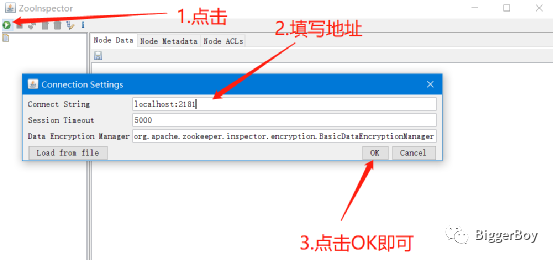
5. 拓展信息
Section titled “5. 拓展信息”…