Firebase推送
firebase 是一个 Google 系的免费的工具集合,一般用于 APP 端(Android 和 iOS)三方工具集成。
2. 工具概览
Section titled “2. 工具概览”- Analytics
用于进行用户跟踪数据采集 - CloudMessage
消息推送 - InAppMessage
消息内推送 - Config
远程控制 APP 内配置项 - DynamicLink(动态链接) APP 优化版的深度链接
- Crashlytics
APP 崩溃监控 - A/B Test
APP 进行 A/B Test
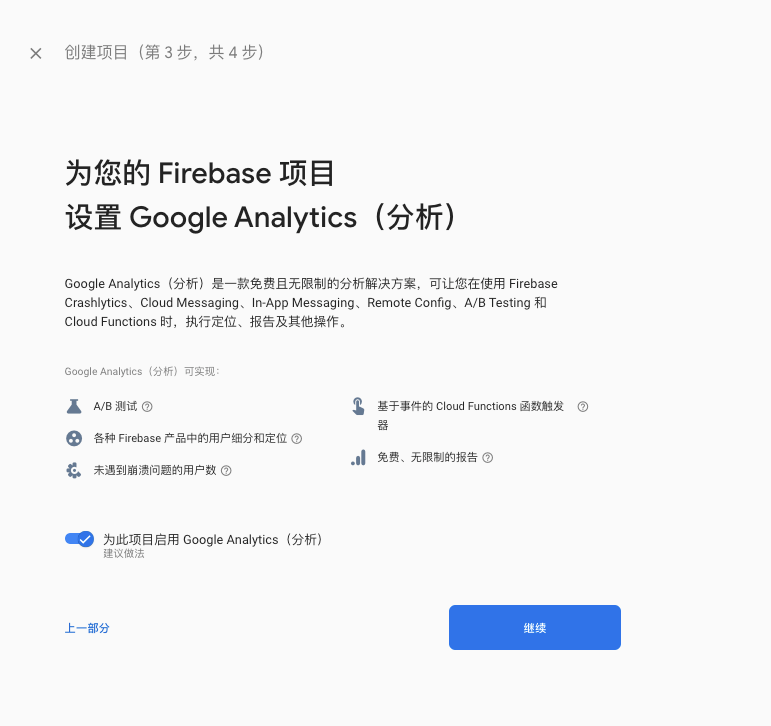
- 创建项目
Firebase 项目用于统一管理各个工具集合。(需要关联 GCP 账户与 Google Aanlytics 账户)
- 创建应用
针对 Android iOS Web 选择对应应用。并获取到对应的 google-services.json 配置文件
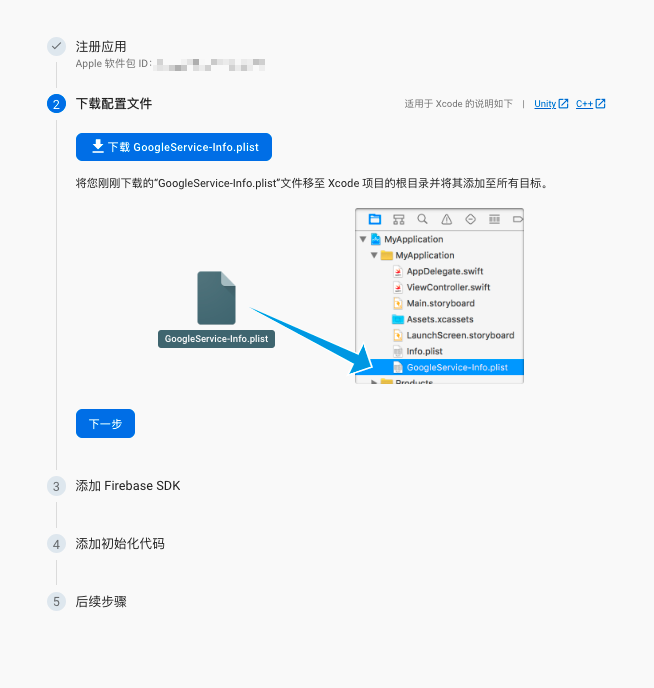
如果应用会用于动态链接,则需要填写应用签名。
- 安装应用
将 Firebase 创建的应该集成到 APP 中-
将 google-services.json 文件放置应用根目录
-
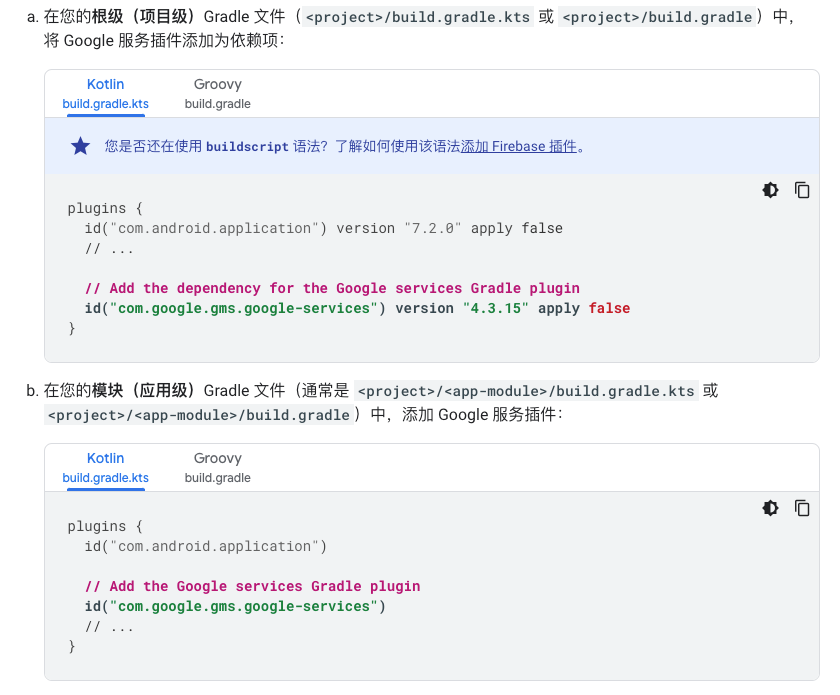
安装 Google 服务 Gradle 插件
-
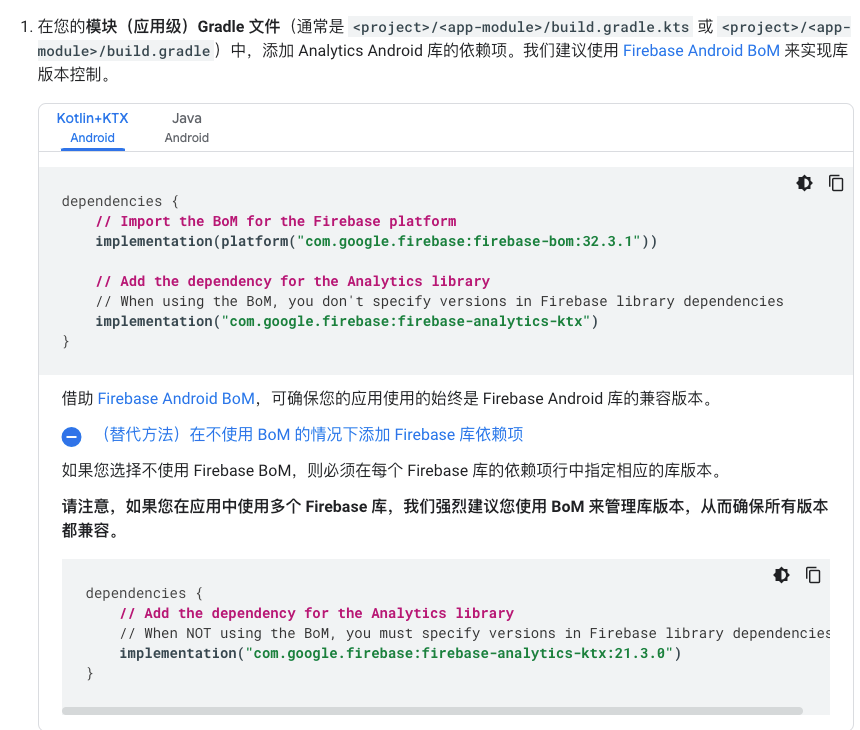
安装 Firebase SDK
-
4. Analytics
Section titled “4. Analytics”用于行为数据采集工具
4.1. 初始化
Section titled “4.1. 初始化”private FirebaseAnalytics mFirebaseAnalytics; #声明mFirebaseAnalytics = FirebaseAnalytics.getInstance(this); #初始化4.2. 上报事件
Section titled “4.2. 上报事件”事件由事件名称与一系列事件参数组成
- 普通事件
Bundle bundle = new Bundle();bundle.putString(FirebaseAnalytics.Param.ITEM_ID, id);bundle.putString(FirebaseAnalytics.Param.ITEM_NAME, name);bundle.putString(FirebaseAnalytics.Param.CONTENT_TYPE, "image");mFirebaseAnalytics.logEvent(FirebaseAnalytics.Event.SELECT_CONTENT, bundle);- 电商事件
Bundle itemJeggingsWithIndex = new Bundle(itemJeggings);itemJeggingsWithIndex.putLong(FirebaseAnalytics.Param.INDEX, 1);Bundle itemBootsWithIndex = new Bundle(itemBoots);itemBootsWithIndex.putLong(FirebaseAnalytics.Param.INDEX, 2);Bundle itemSocksWithIndex = new Bundle(itemSocks);itemSocksWithIndex.putLong(FirebaseAnalytics.Param.INDEX, 3);Bundle viewItemListParams = new Bundle();viewItemListParams.putString(FirebaseAnalytics.Param.ITEM_LIST_ID, "L001");viewItemListParams.putString(FirebaseAnalytics.Param.ITEM_LIST_NAME, "Related products");viewItemListParams.putParcelableArray(FirebaseAnalytics.Param.ITEMS,new Parcelable[]{itemJeggingsWithIndex, itemBootsWithIndex, itemSocksWithIndex});mFirebaseAnalytics.logEvent(FirebaseAnalytics.Event.VIEW_ITEM_LIST, viewItemListParams);Analytics 的自定义事件参数需要现在 Google Analytic 中进行注册
4.3. 设置用户属性
Section titled “4.3. 设置用户属性”用户属性用于来标识用户的特征
mFirebaseAnalytics.setUserProperty("favorite_food", food);Analytics 的自定义用户属性需要现在 Google Analytic 中进行注册
4.4. 设置用户 ID
Section titled “4.4. 设置用户 ID”用户 ID 需要可以用于跨平台用户关联
mFirebaseAnalytics.setUserId("123456");非必须
4.5. 查看日志
Section titled “4.5. 查看日志”可以通过日志查看 Firebase 的日志信息。
adb shell setprop log.tag.FA VERBOSEadb shell setprop log.tag.FA-SVC VERBOSEadb logcat -v time -s FA FA-SVC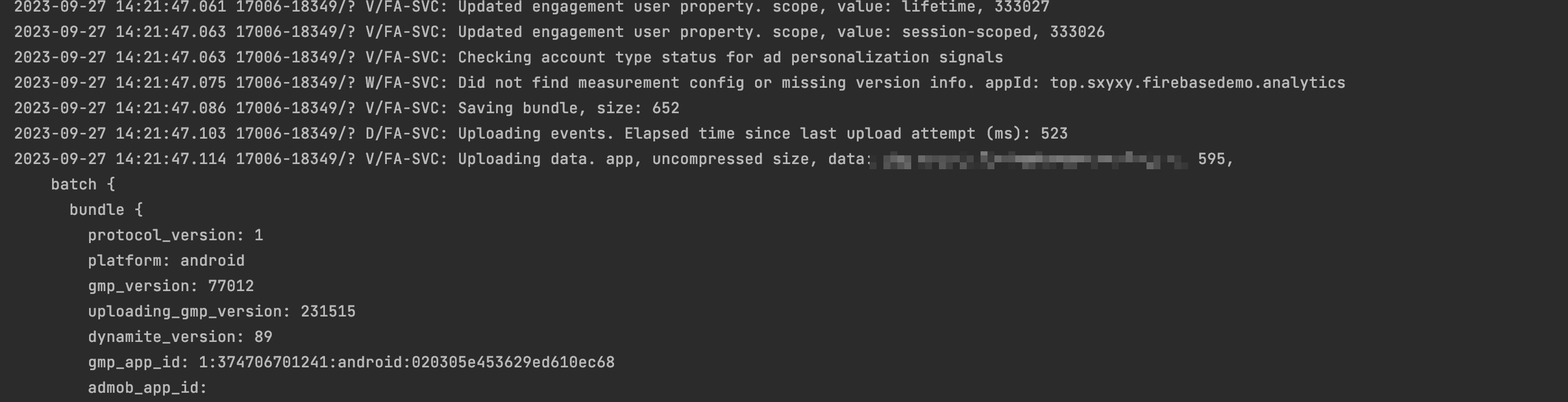
4.6. 调试
Section titled “4.6. 调试”可以通过调试面板查看具体的事件等信息
adb shell setprop debug.firebase.analytics.app PACKAGE_NAME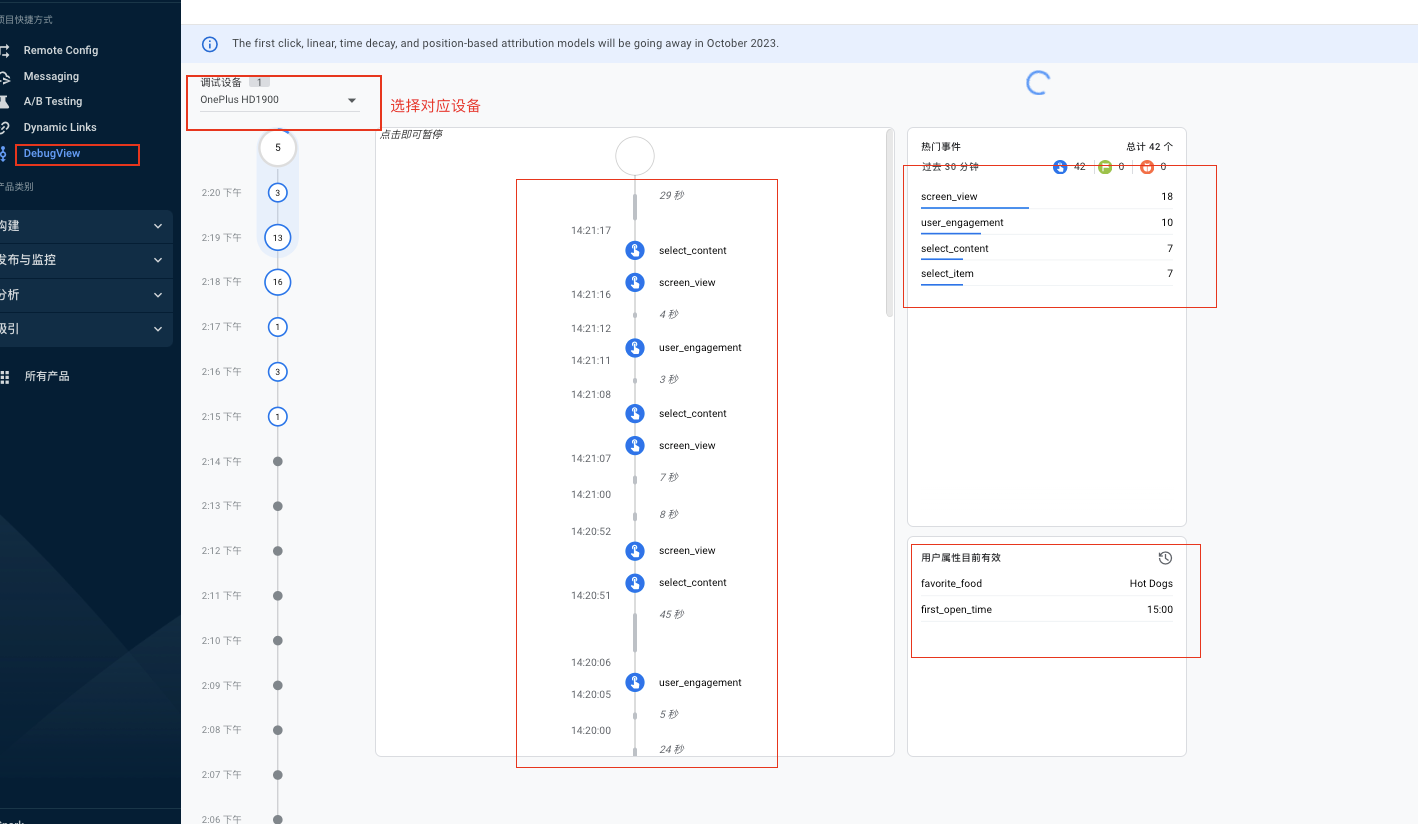
4.7. 拓展信息
Section titled “4.7. 拓展信息”- 内置 H5 页面的数据采集方案
- 方案 1
实施方式: 在同一个 GA Property 中创建 Web Stream,并且将数据直接发送到 Web Stream 中。
优势:- 可以在 H5 页面使用一套埋点
劣势: - 可能会造成用户(可以传递用户的 app_instance_id 来避免)与会话拆分、影响到归因。
- 可以在 H5 页面使用一套埋点
- 方案 2
实施方式:-
将 H5 请求转发到 Android 原生应用,然后转发到 GA
优势: -
不会有用户与会话切分,不会影响到归因 劣势:
-
需要维护两套埋点 实施步骤:
-
H5 页面处理程序
function logEvent(name, params) {if (!name) {return;}if (window.AnalyticsWebInterface) {// Call Android interfacewindow.AnalyticsWebInterface.logEvent(name, JSON.stringify(params));} else if (window.webkit&& window.webkit.messageHandlers&& window.webkit.messageHandlers.firebase) {// Call iOS interfacevar message = {command: 'logEvent',name: name,parameters: params};window.webkit.messageHandlers.firebase.postMessage(message);} else {// No Android or iOS interface foundconsole.log("No native APIs found.");}}function setUserProperty(name, value) {if (!name || !value) {return;}if (window.AnalyticsWebInterface) {// Call Android interfacewindow.AnalyticsWebInterface.setUserProperty(name, value);} else if (window.webkit&& window.webkit.messageHandlers&& window.webkit.messageHandlers.firebase) {// Call iOS interfacevar message = {command: 'setUserProperty',name: name,value: value};window.webkit.messageHandlers.firebase.postMessage(message);} else {// No Android or iOS interface foundconsole.log("No native APIs found.");}} -
Android 处理程序
public class AnalyticsWebInterface {public static final String TAG = "AnalyticsWebInterface";private FirebaseAnalytics mAnalytics;public AnalyticsWebInterface(Context context) {mAnalytics = FirebaseAnalytics.getInstance(context);}@JavascriptInterfacepublic void logEvent(String name, String jsonParams) {LOGD("logEvent:" + name);mAnalytics.logEvent(name, bundleFromJson(jsonParams));}@JavascriptInterfacepublic void setUserProperty(String name, String value) {LOGD("setUserProperty:" + name);mAnalytics.setUserProperty(name, value);}private void LOGD(String message) {// Only log on debug builds, for privacyif (BuildConfig.DEBUG) {Log.d(TAG, message);}}private Bundle bundleFromJson(String json) {// ...}} -
注册程序
if (Build.VERSION.SDK_INT >= Build.VERSION_CODES.JELLY_BEAN_MR1) {mWebView.addJavascriptInterface(new AnalyticsWebInterface(this), AnalyticsWebInterface.TAG);} else {Log.w(TAG, "Not adding JavaScriptInterface, API Version: " + Build.VERSION.SDK_INT);}
-
- 方案 1
5. CloudMessage
Section titled “5. CloudMessage”消息推送工具
- 支持 Firebase 控制或者 API 构建推送消息
- 支持单设备、设置组、
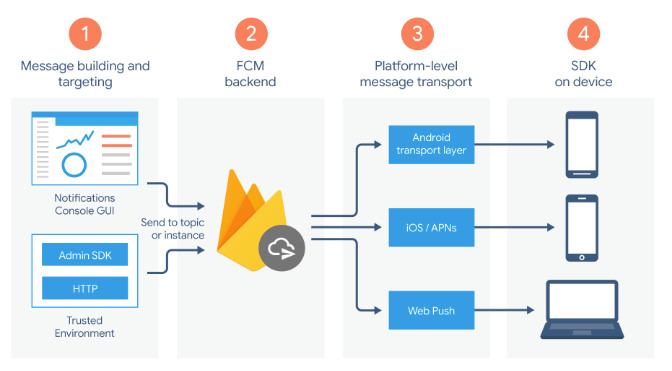
5.1. 架构
Section titled “5.1. 架构”CLoudMessage 实现架构
5.2. 消息类型
Section titled “5.2. 消息类型”- 消息类型
| 消息类型 | 使用场景 | 发送方式 |
|---|---|---|
| 通知消息 | FCM SDK 自动处理 | 1.API 设置 nofification 键 2.Firebase 设置控制台 |
| 数据消息 | 客户端自定义处理 | API 设置 data 键 |
- 通知状态
| 应用状态 | 通知 | 数据 | 两者皆有 |
|---|---|---|---|
| 前台 | onMessageReceived | onMessageReceived | onMessageReceived |
| 后台 | 系统托盘 | onMessageReceived | 通知:系统托盘 数据:在 intent 附加内容中 |
程序退出不影响推送
6. 拓展信息
Section titled “6. 拓展信息”-
部分工具服务依赖于 Google Play 服务.
-
Firebase ID Firebase 中常见的 ID 信息。
- Firebase Instace ID
是应用安装的标识。后期被废弃转用 Firebase Installations ID(FID) - Firebase Installation ID
最新版用于安装的标识 - Firebase Analytics ID
用于在 GA 标识用户的 ID
Firebase Instace ID 与 Firebase Analytics ID 不一致。
- Firebase Instace ID