Locust压测
一个基于 python 的并发压力测试工具
- 随时停止
- 下载测试报告
pip install locust- 编写普通 API 脚本
from locust import HttpUser, task, between
class APIUser(HttpUser):    wait_time = between(1, 30)
@task def test_sse(self): response = self.client.get("/test_path/?name=&page_number=1&page_size=10000&range_in=all",headers={"Authorization": "Token a997b320953eae1ce24a765ca7648d5ed1742546"})- 编写 sse 调用脚本
from locust import HttpUser, task, between
class SSEUser(HttpUser): wait_time = between(1, 120) @task def test_sse(self): a = self.client.post("/sse/", data={ "qa_id": 1, "answer": """测试""", "is_last_question": False, }, stream=True, headers={"Authorization": "Token a997b320953eae1ce24a765ca7648d5ed1742546"}) # print(a.text) # for line in a.iter_lines(): # if line: # print(line.decode('utf-8')) # 打印 SSE 事件- 启动服务
locust -f locust_sse.py- web 页面配置并发
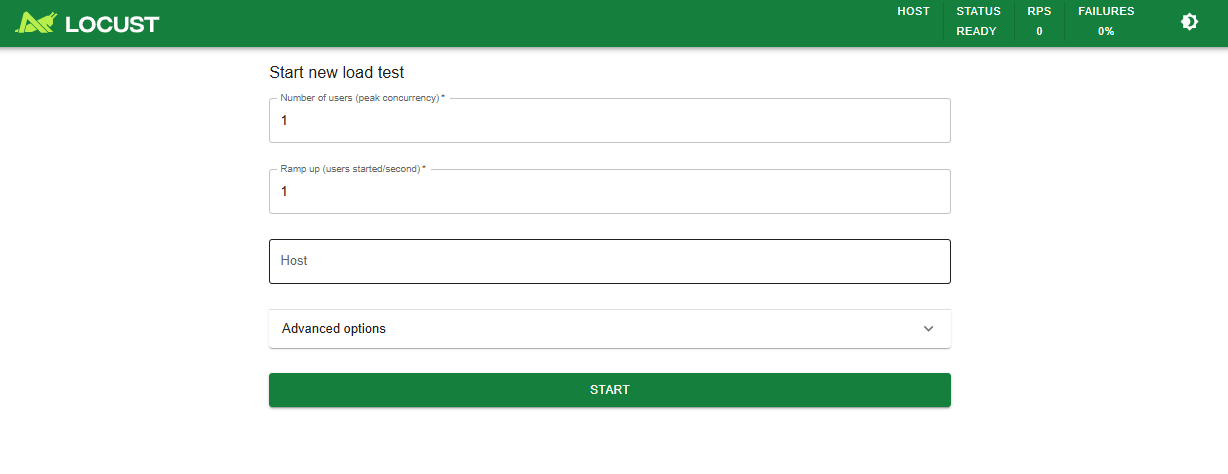
Ramp up 代表用户平滑线性增加
4. 拓展信息
Section titled “4. 拓展信息”4.1. Wrk 命令行并发工具
Section titled “4.1. Wrk 命令行并发工具”- 编写参数文件
wrk.headers["authorization"] = "Token a997b320953eae1ce24a765ca7648d5ed1742546" wrk.method = "POST" wrk.body = '{"qa_id": 1}' wrk.headers["Content-Type"] = "application/json"- 测试命令
wrk -t10 -c200 -d30s --timeout 30 -s test.lua https://www.example.com/test/4.2. Ab 命令行并发工具
Section titled “4.2. Ab 命令行并发工具”- 编写参数文件
{ "qa_id": 1}- 测试命令
ab -c 2 -n 2 -p test.txt -T application/json -H "Authorization:Token a997b320953eae1ce24a765ca7648d5ed1742546" https://www.example.com/test/