Auth0 身份验证
Auth0 是一款功能强大的 IDaaS (Identity as a Service) 云服务商,致力于简化应用程序的身份验证和授权。它支持 OAuth 2.0, OpenID Connect (OIDC) 等标准协议,让开发者无需自行构建复杂的账号系统即可实现社交登录、多因素认证 (MFA) 和单点登录 (SSO)。
2. 核心概念
Section titled “2. 核心概念”2.1. Application (应用)
Section titled “2.1. Application (应用)”代表任何需要 Auth0 帮助进行认证和授权的客户端。
- SPA (React/Vue):使用 Authorization Code Flow with PKCE。
- Regular Web App (Express/Django):使用 Authorization Code Flow (配合
client_secret)。 - Native App (iOS/Android):使用 PKCE 流程。
- M2M App:后端服务间通信,使用 Client Credentials Flow。
2.2. API (资源服务器)
Section titled “2.2. API (资源服务器)”代表通过 OAuth 2.0 Access Token 保护的后端服务。API 会验证由 Auth0 颁发的令牌,并基于 Scope(作用域)进行精细化授权。
2.3. Connections (连接)
Section titled “2.3. Connections (连接)”定义了用户身份的来源:
- Database:Auth0 管理的数据库或自定义外部数据库。
- Social:Google, GitHub 等社交登录。
- Enterprise:AD, SAML 等企业身份源。
2.4. RBAC 模型 (Role & Permission)
Section titled “2.4. RBAC 模型 (Role & Permission)”通过 Role(角色)和 Permission(权限)实现基于角色的访问控制,方便对用户群体进行权限编排。
2.5. Actions (扩展逻辑)
Section titled “2.5. Actions (扩展逻辑)”允许在认证生命周期的特定阶段插入自定义代码(Serverless 触发器),例如:
pre-user-registration: 注册前检查。post-login: 登录后添加自定义 Claim。
3. 集成方式
Section titled “3. 集成方式”3.1. 前端集成 (Vue.js 示例)
Section titled “3.1. 前端集成 (Vue.js 示例)”import { createAuth0 } from '@auth0/auth0-vue';
const app = createApp(App);
app.use( createAuth0({ domain: "[DOMAIN_已隐藏].us.auth0.com", clientId: "[CLIENT_ID_已隐藏]", authorizationParams: { redirect_uri: window.location.origin } }));
app.mount('#app');
<template> <div> <button @click="login">Log in</button> </div></template><script> // Composition API import { useAuth0 } from '@auth0/auth0-vue';
export default { setup() { const auth0 = useAuth0();
return { login() { auth0.loginWithRedirect(); } }; } };</script>
<template> <div> <button @click="logout">Log out</button> </div></template><script> // Composition API import { useAuth0 } from '@auth0/auth0-vue';
export default { setup() { const auth0 = useAuth0();
return { logout() { auth0.logout({ logoutParams: { returnTo: window.location.origin } }); } }; } };</script>
<template> <div v-if="isLoading">Loading ...</div> <div v-else> <h2>User Profile</h2> <button @click="login">Log in</button> <pre v-if="isAuthenticated"> <code>{{ user }}</code> </pre> </div></template><script> // Composition API import { useAuth0 } from '@auth0/auth0-vue';
export default { setup() { const auth0 = useAuth0();
return { login: () => auth0.loginWithRedirect(), user: auth0.user, isAuthenticated: auth0.isAuthenticated, isLoading: auth0.isLoading, }; } };</script>3.2. 后端
Section titled “3.2. 后端”import jsonfrom urllib.request import urlopen
from authlib.oauth2.rfc7523 import JWTBearerTokenValidatorfrom authlib.jose.rfc7517.jwk import JsonWebKey
class Auth0JWTBearerTokenValidator(JWTBearerTokenValidator): def __init__(self, domain, audience): issuer = f"https://{domain}/" jsonurl = urlopen(f"{issuer}.well-known/jwks.json") public_key = JsonWebKey.import_key_set( json.loads(jsonurl.read()) ) super(Auth0JWTBearerTokenValidator, self).__init__( public_key ) self.claims_options = { "exp": {"essential": True}, "aud": {"essential": True, "value": audience}, "iss": {"essential": True, "value": issuer}, }
from os import environ as envfrom dotenv import load_dotenv, find_dotenvfrom flask import Flask, jsonifyfrom authlib.integrations.flask_oauth2 import ResourceProtectorfrom validator import Auth0JWTBearerTokenValidator
# 初始化资源保护器require_auth = ResourceProtector()validator = Auth0JWTBearerTokenValidator( "[DOMAIN_已隐藏].us.auth0.com", "https://api.example.com")require_auth.register_token_validator(validator)
APP = Flask(__name__)
@APP.route("/api/public")def public(): """No access token required.""" response = ( "Hello from a public endpoint! You don't need to be" " authenticated to see this." ) return jsonify(message=response)
@APP.route("/api/private")@require_auth(None)def private(): """A valid access token is required.""" response = ( "Hello from a private endpoint! You need to be" " authenticated to see this." ) return jsonify(message=response)
@APP.route("/api/private-scoped")@require_auth("read:messages")def private_scoped(): """A valid access token and scope are required.""" response = ( "Hello from a private endpoint! You need to be" " authenticated and have a scope of read:messages to see" " this." ) return jsonify(message=response)4. 费用信息
Section titled “4. 费用信息”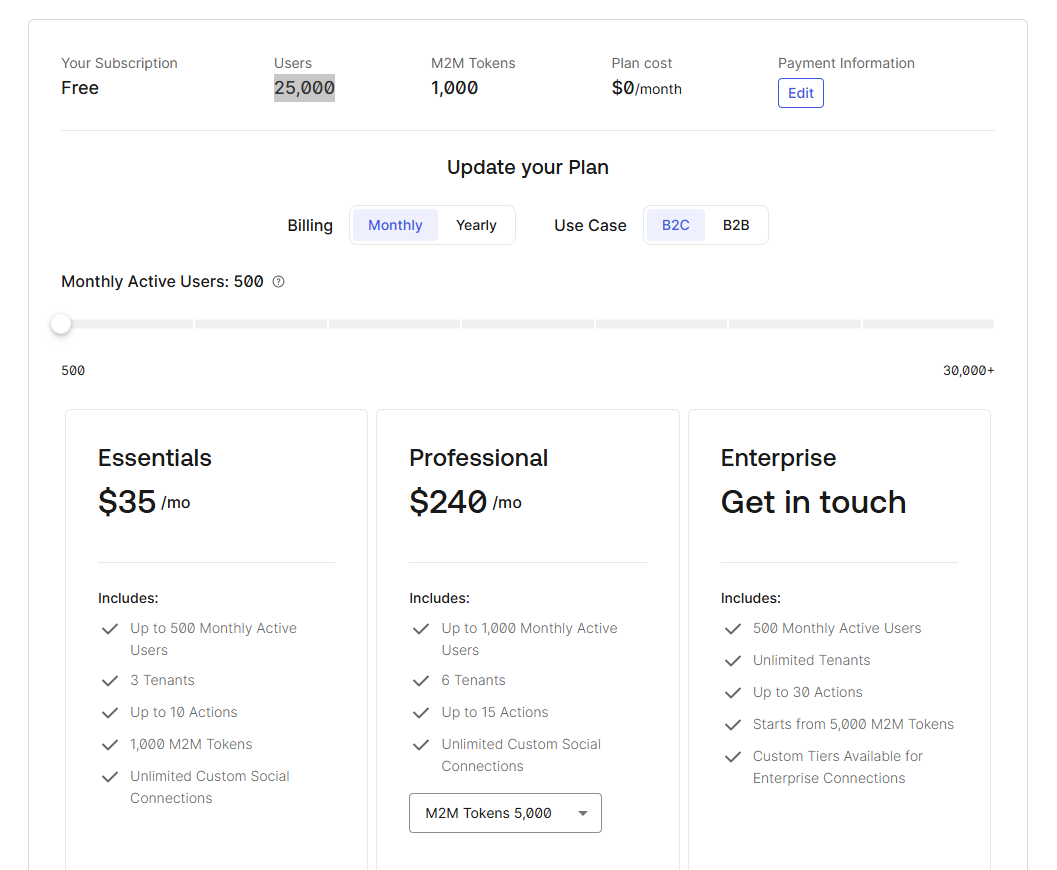
5. 拓展信息
Section titled “5. 拓展信息”- OpenAI 也是 Auth0 的深度用户,其 ChatGPT 的登录体系便基于此构建。
- 费用模型:Auth0 提供免费额度(支持数千 MAU),随着活跃用户数和企业特性的增加而产生费用。